← Back to Newsletter Archives
June 2026 – Volume 30 Issue 2

To meet the GAAP (Generally Accepted Accounting Principles) reporting requirements at end of fiscal year, certain entries need to be recorded in June (for organizations with a fiscal year from July to June) or August (for Nebraska school districts with a fiscal year from September to August). The School Accounting System has a variety of options available to assist with the expensing process and record the necessary entries to the appropriate fiscal year.
In Payroll, the unpaid salaries and benefits earned this year must be expensed to the current fiscal year. For example, for organizations with a fiscal year running from July to June, the July and August contract balances (such as for teachers), along with the June wages for unit employees, must be expensed to June. Within the School Accounting System, there are four options available to expense the salaries and benefits by completing the necessary payroll calculations for the appropriate payroll type: Regular (Method 1); Expense Payroll (Method 2); Pay Off Contracts (Method 3); or Reversing GAAP (Method 4, which is applicable for Iowa school districts who reverse GAAP expense only).
In Accounts Payable, the invoices and purchase orders for merchandise received but not yet paid must be expensed to the current fiscal year. For those operating Accounts Payable on an accrual basis, only purchase orders would need to be expensed, if applicable (as a reminder, invoices are already expensed at the time they are posted when operating on accrual). Within the School Accounting System, there are two options available to handle the expensing in Accounts Payable: expensing invoices at the time of entry (Method 1), or using the Expense Outstanding Payables option (Method 2) to expense invoices that were previously entered/posted but not yet paid or to expense outstanding purchase orders.
In General Ledger, outstanding receivables must be recorded to the current fiscal year for money earned but not yet received. Within the School Accounting System, the outstanding receivables can be entered two different ways: as cash receipts (Method 1), or as manual journal entries (Method 2).
For step-by-step instructions on completing the various expensing methods, refer to the Payroll End of Fiscal Year Checklist, Accounts Payable End of Fiscal Year Checklist, and General Ledger End of Fiscal Year Checklist in the Help File, or click here to request the end of fiscal year webinar recordings from the Training Calendar on our website.
Newsletter Survey
 On the topic of expensing the necessary entries at end of fiscal year: Which method(s) do you use to expense the unpaid salaries and benefits at EOFY in Payroll? Which items do you expense at EOFY in Accounts Payable? Which method do you use to enter outstanding receivables at EOFY in General Ledger?
Click the Survey Question link to participate in the survey.
Please be sure to submit your response. We look forward to your participation in all our surveys.
Previous Survey Results
The Newsletter Survey questions for the March 2026 issue related to payroll purchase orders. The survey questions and responses are shown below.
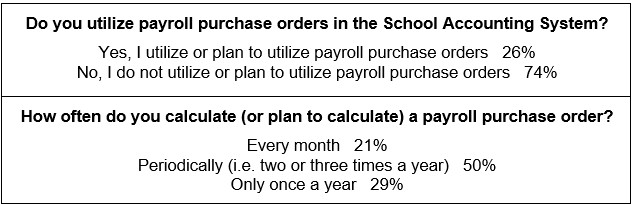
Thanks to everyone who participated in our survey!
Update: A Modern Web Link Experience is Almost Here
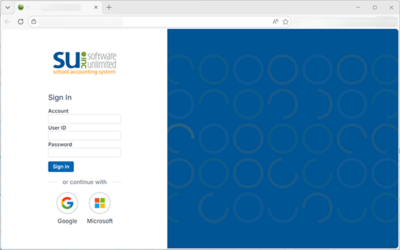
We’re excited to share that we’ve officially reached a major milestone – the modern Web Link experience will soon be available to all hosted customers!
This release represents much more than a refreshed look and feel. It provides the foundation for the next generation of the School Accounting System, bringing a more modern, intuitive, and flexible experience for your staff while creating a platform for future enhancements.
Toward the end of July, we’ll begin inviting customers to upgrade to the modern Web Link experience at no additional cost. We’ll provide details about the upgrade process and scheduling opportunities to help make the transition as smooth as possible.
If you’d like to get on the upgrade list early, click here to sign up today!
This is just the beginning. Over the coming months, we’ll continue to introduce enhanced features and new functionality within the modern Web Link experience as we build toward the future of the School Accounting System.
End of Fiscal Year Tips

As you complete the end of fiscal year activities, keep these tips in mind:
- Be sure to use the end of fiscal year checklists listed below to ensure all steps are completed:
- If needed, to expense a credit card payment batch of invoices to the current fiscal year, create the invoice batch as normal by completing the Credit Card Payment Batch section and entering a Processing Month in the current fiscal year, and then enter the invoices for the credit card payment within the batch as normal (the system will expense the credit card payment batch of invoices to the current fiscal year, while also reducing the appropriate cash account balance).
- When expensing salaries and benefits in Payroll, different methods can be used for different groups of employees. For example, Method 3 can be used to pay off contracts for retiring employees in order to print and distribute their checks in June, and Method 2 can be used for the other employees to expense salaries and benefits to June while waiting to write their checks until the July and August payrolls. To complete different methods for different groups of employees, the employees would need to be in different pay groups. To assign an employee to a different pay group, change the pay group ID on the Employment screen in the Employee File (or change the pay group ID for only the appropriate pay codes on the Wages screen, if applicable).
- Prior to creating the new year for leaves in Payroll, be sure to process all absence entries and leave requests (if applicable) if the ending balance from this year will be carried forward to the beginning balance for the new year.
- When generating the Annual Report and GASB 34 Reports in General Ledger, invalid account numbers (those that are not included on the reports) can typically be resolved by completing one of the following three options: (1) crosswalk the account numbers to valid account numbers and then regenerate; (2) complete manual journal entries to move the balances to valid accounts and then regenerate; or (3) manually edit the report (if applicable).
To review the process for completing the end of fiscal year activities, click here to request the end of fiscal year webinar recordings from the Training Calendar on our website.
Check Reconciliation: How to close a batch and how to access a closed batch?
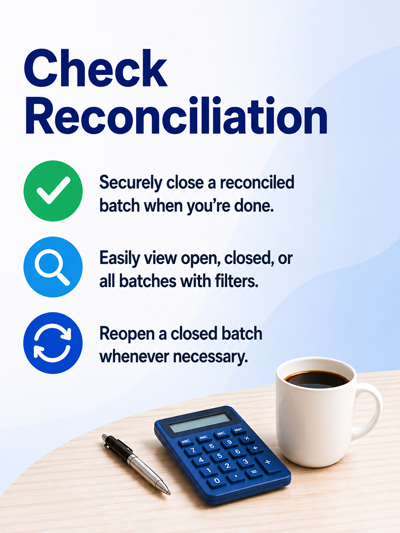
A check reconciliation batch that has been reconciled successfully can be closed to prevent it from displaying on the batch search screen when accessing the Check Reconciliation option in the future. To close a batch, complete the following steps:
- From the General Ledger screen, select the Check Options menu and then Check Reconciliation.
- The Check Reconciliation Batch Search screen will appear listing all the current (open) check reconciliation batches.
- Select the desired check reconciliation batch to close by double-clicking on the batch description.
- Within the check reconciliation batch, select the Options menu and then Close Batch.
If needed, to access a closed check reconciliation batch, complete the following:
- From the General Ledger screen, select the Check Options menu and then Check Reconciliation.
- The Check Reconciliation Batch Search screen will appear listing all the current (open) check reconciliation batches. (Note: If a check reconciliation batch does not exist, the Check Reconciliation screen will appear instead; click the Find button to access the Check Reconciliation Batch Search screen, and if prompted, select No to save changes.)
- On the Check Reconciliation Batch Search screen, change the filter for the Closed field (column) to show All (open and closed batches) or True (only closed batches).
- Then select the desired closed check reconciliation batch by double-clicking on the batch description.
Tip: A closed check reconciliation batch can be made open again, so that it displays on the Batch Search screen when the Check Reconciliation option is selected in the future. To reopen a batch, access the closed batch and then select the Options menu and Reopen Batch.
Support Corner - Amy Feit, Chief Customer Officer

Security Enhancement Update: MFA Rollout and Hosted Backup Improvements
Over the past several months, we have been transitioning School Accounting System-Online customers to our enhanced security environment. We wanted to provide an update on our progress, answer some common questions, and share additional resources to help districts prepare for their transition.
To date, we have successfully transitioned approximately 30% of our hosted customer base. Districts that have not yet transitioned will continue to be contacted over the coming months with their planned migration date.
As a reminder, this upgrade includes two important enhancements. First, Multi-Factor Authentication (MFA) will be required for all SAS-Online users. Second, we are modernizing backup management within the hosted environment. In-application backups will be disabled, and backups will instead be securely managed within the hosted environment.
Databases can be restored to a precise point in time—down to the second—within the previous 30 days. While restores are rarely needed, this improvement provides greater flexibility and peace of mind should the need arise.
As we’ve worked with districts during the rollout, several common questions have emerged. To help answer those questions, we have compiled a Frequently Asked Questions document that can be accessed here:
FAQ: What is Multi-factor Authentication (MFA), why is it important and what are the options for implementation in SAS-Online?
Our goal remains to complete the transition of all School Accounting System-Online customers to this enhanced environment over the next six months.
These improvements represent an important investment in protecting district data while strengthening recovery capabilities and overall system resiliency.
If you have questions, please contact Customer Support at 800.756.0035 ext. 2 or email support@su-inc.com.
Training Snippets
Each quarter the Training Snippets tutorial covers topics for new options or changes included in recent updates, along with a quick tip for an option or shortcut.
A few of the topics included in the Training Snippets tutorial for June 2026 are: end of fiscal year reports; reduced purchase order balances with importing invoices; updated pay code import with up to ten default chart of accounts numbers; Override Expense Accounts tab for deductions and taxes; new Batch tab in Adjust Posted Entries; update to Receiving in modern Web Link; and lastly a reminder of the Select Invoice Criteria option in Human Resources.
Click here (or on the image) to watch the 6-minute tutorial. To review all the changes and enhancements included in recent updates, click here to view the release notes.
Trivia Challenge

It is time for another Software Unlimited, Inc. Trivia Challenge. In each newsletter, we will test your knowledge by asking a question on various topics ranging from options in the School Accounting System to information about the company of Software Unlimited, Inc. If you are up to the challenge, try to answer the question and you may be eligible to win a USB flash drive.
Q. Is there a way to reopen a ‘closed’ check reconciliation batch? Click to answer
A winner will be selected at random from the list of correct respondents. Don’t forget to read the Trivia Challenge article in the next newsletter to see the winner and correct answer. Good luck!
In last quarter’s newsletter, the Trivia Challenge asked, What module allows staff to enter and submit requisitions and leave requests for electronic approval; access pay stubs, W2s, 1095s, and leave balances; and view/update personal information? The answer is Web Link. Congratulations to Teresa McGinnis from Crawford Public Schools for being selected at random from the list of correct respondents and winning a USB flash drive.
Baby Block

Congratulations to Elizabeth and Aaron! Elizabeth and Aaron, who both work in our Development Department, welcomed a new baby girl to their family. Sophia Marisol was born in February, weighing 6 pounds 5 ounces. We are so happy for Elizabeth and Aaron and their new little bundle of joy!
Closures

Software Unlimited, Inc. will be closed on:
July 3 for observance of Independence Day
September 7 for Labor Day
Staff Spotlight - Alli Hofflander

I joined the Training team at Software Unlimited, Inc., in September of 2024. Since I started working here, I have loved teaching our customers new and exciting ways to use our tools. Before joining Software Unlimited, Inc., I worked with a different software company in Product Delivery, ensuring the software was configured in the best way possible to satisfy customers.
When I am not at work, I enjoy reading, crafting, and cooking delicious meals while my cats pester my husband. I can also be found enjoying the great outdoors, whether that’s hiking, camping, or gardening.
Customer Showcase

Each quarter we are excited to feature one of our customers who was selected randomly to be highlighted in our Customer Showcase. The customer being showcased this quarter is Shirley Maxwell who is the Mentoring Program Coordinator with the Iowa School Business Institute. We had these questions for her:
How long have you been using the School Accounting System?
• I have been using the software for over 30 years!
What module do you spend most of your time working in?
• I spend most of my time in General Ledger.
What is your favorite feature in the School Accounting System?
• I love the Check Reconciliation option in General Ledger; the software makes it so easy to reconcile with bank statements.
What are three words you would use to describe the School Accounting System?
• Your software is reliable, staff is well-trained, and company is open to suggestions and implementation within the software.
What is your favorite part of working at your organization?
• I have a few – they include: helping school business officials and administration; seeing a little row of kindergarteners walking past your window and now they are graduates (it feels good knowing you have contributed to their success); and helping community and people.
What are your hobbies?
• I enjoy spending time with my family including grandchildren and great-grandchildren. I spend a lot of time at livestock shows with them. I am very active in my church, enjoying bible study and delivering meals on wheels. I love contributing to my community.
What is one piece of advice you would give someone who is new to using the School Accounting System?
• The only dumb question is the question that isn’t asked. Don’t hesitate to reach out and ask for help. There’s always someone there to help whether it is contacting customer support or a neighboring district. Don’t do this alone. I could have never made it in this business if it wasn’t for those that helped me out in the beginning. You will always be learning.
