
- Knowledge Base Categories:
- Payroll
FAQ: For Kansas organizations, how can I reduce the Workers Compensation gross for contract employees by the amount paid while using leave?
If needed, to reduce the gross amount of Workers Compensation for a contract employee by the amount the employee was paid while using leave, complete a deduction/tax adjustment for Workers Compensation for the employee. When entering the deduction/tax adjustment, calculate the amount the employee was paid for the leave by taking the number of days of leave the employee used multiplied by the employee’s daily rate of pay. Then enter that calculated amount in the Gross Amount field for the deduction/tax adjustment and select Decrease Amount or Gross in the Gross Action field. See below for an example of a deduction/tax adjustment to decrease the Workers Compensation gross for an employee who had used three days of sick leave with a daily rate of pay of $185 (3 x $185 = $555).
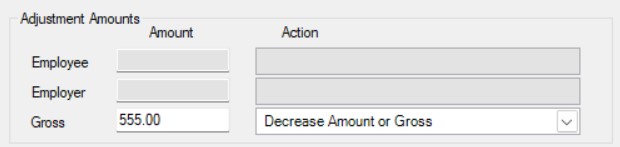
To determine how many days of leave an employee used, generate a report. If deduction/tax adjustments will be completed only once at the end of the fiscal year, generate the Employee Leave Balance Report (accessed under the Reports menu in Payroll and the Employee Reports (PR) grouping), being sure to complete the parameters for the desired pay groups and the start date of the leave year to include. If deduction/tax adjustments will be completed on a regular basis throughout the year (i.e. completed monthly or quarterly), generate the Employee Absence Report (accessed under the Reports menu in Payroll and the Absence Reports grouping), being sure to complete the parameters for the desired pay groups and the appropriate date range of entries to include.
To view a report showing the daily rate of pay (absence per day rate) for contract employees, generate the Employee Listing-Wage Information report (accessed under the Reports menu in Payroll and the Employee Reports (PR) grouping), being sure to complete the parameters for the desired pay groups, pay codes, and fiscal year end of wages to include.
For detailed instructions on completing deduction/tax adjustments, refer to the Entering Deduction/Tax Adjustments topic in the Help File.