
- Knowledge Base Categories:
- School Accounting System
- Payroll
Training Tidbit: Be sure overtime pay codes are set up correctly for 2026 (for use with reporting qualified overtime compensation on 2026 W2s)
To prepare for 2026, make sure you have overtime set up correctly in order to properly report qualified overtime compensation on the 2026 W2s. Within Payroll, overtime must be set up as a separate pay code (separate from regular rate pay codes), and a separate overtime pay code must be defined for each of the following: for overtime paid using the full overtime rate of time and a half, for overtime paid as just the “half” amount of the time and a half rate, and for overtime paid as double time (if applicable). By having separate overtime pay codes defined, you will be able to specify the correct Federal Form Box ID to report the qualified overtime compensation on the 2026 W2s, and also designate the rate method used so the appropriate amount will be posted.
To help distinguish overtime pay codes from other regular rate pay codes, select the Overtime field in the Pay Codes option (accessed under the Maintenance menu in Payroll) for all overtime pay codes, as shown in the diagram below.

If you use the Time Cards option in Payroll, also complete the following items:
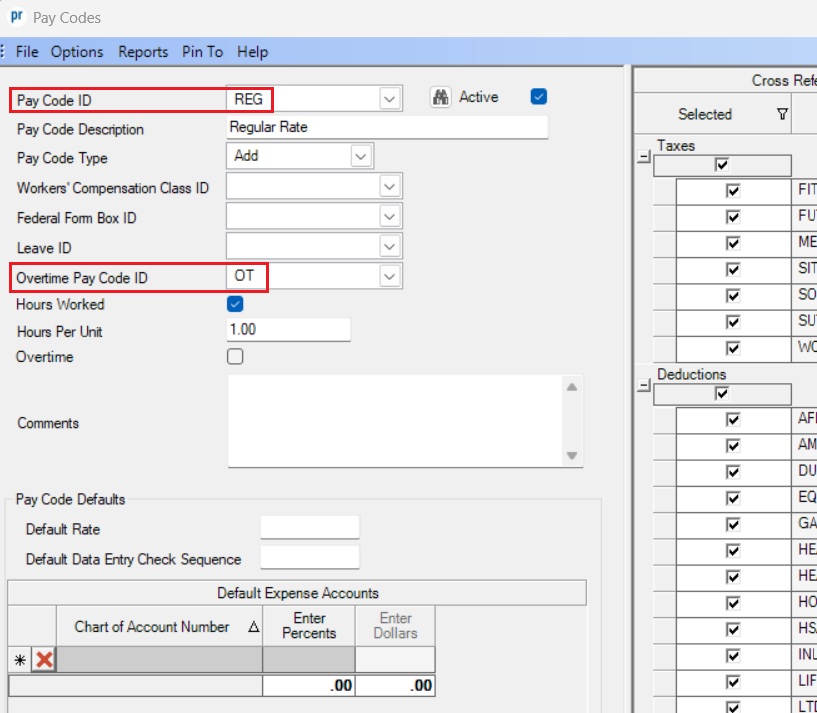
- Verify the regular rate pay codes are tied to the applicable overtime pay codes by completing the Overtime Pay Code ID field in the Pay Codes option, as shown below. The Overtime Pay Code ID field designates which overtime pay code to use to pay overtime wages for those employees with the specified regular rate pay code, if applicable.
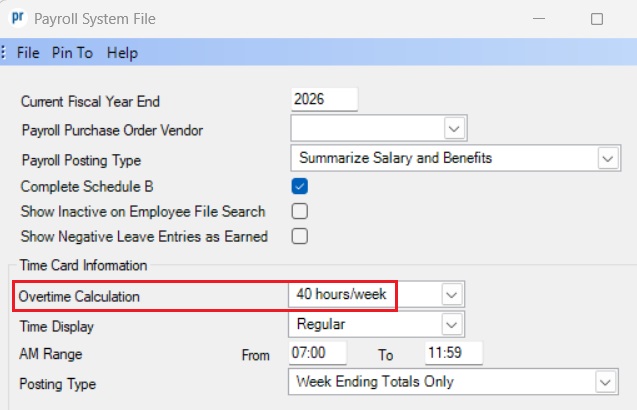
- Verify overtime is set within the Payroll System File (accessed under the Maintenance menu in Payroll) to calculate based on 40 hours per week rather than 8 hours per day, as shown in the second diagram below.
Tip: If a blended overtime rate is used, you may want to consider using the Prorate Overtime field with the Time Cards option (see diagram below) instead of having to calculate a blended overtime rate, as the Prorate Overtime option calculates the overtime proportionately to the hours worked at the various pay codes for employees who are paid with multiple pay codes; for example, if an employee worked 30 hours as a cook and 10 hours as a library assistant and also had 10 hours of overtime, the Prorate Overtime option calculates 7.5 hours of overtime using the overtime pay code for cook and 2.5 hours using the overtime pay code for library assistant. Click here to view the Prorate Overtime Tutorial.

Note: For details on providing employees their total qualified overtime compensation for 2025, click here to refer to the applicable Training Tidbit.